Do you want to know how to make Windows XP bypass the logon screen, and
automatically login to your user account when you turn on your computer?
This setup is only recommended for those people who will be the only
ones accessing the computer. It's not a good business practice to use
this technique at work or where a computer is shared among multiple
people.
Note: If your computer is a part of a domain (generally a work computer) this tip will not work.
Note: If your computer is a part of a domain (generally a work computer) this tip will not work.
- From the Start menu, click Run...
- In the Run... dialog box, type "control userpasswords2", and press OK button.
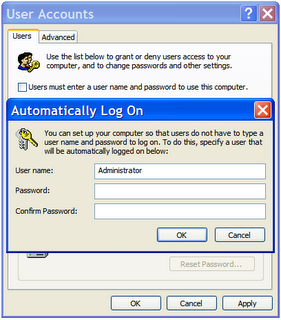
- Uncheck the 'Users must enter a user name and password to use this computer' checkbox, and then press the Apply button.
- In the 'Automatically Log On' dialog, enter the user name and password that you want to use to log into the computer.
- Then press the next two OK buttons

No comments:
Post a Comment